
 Что это
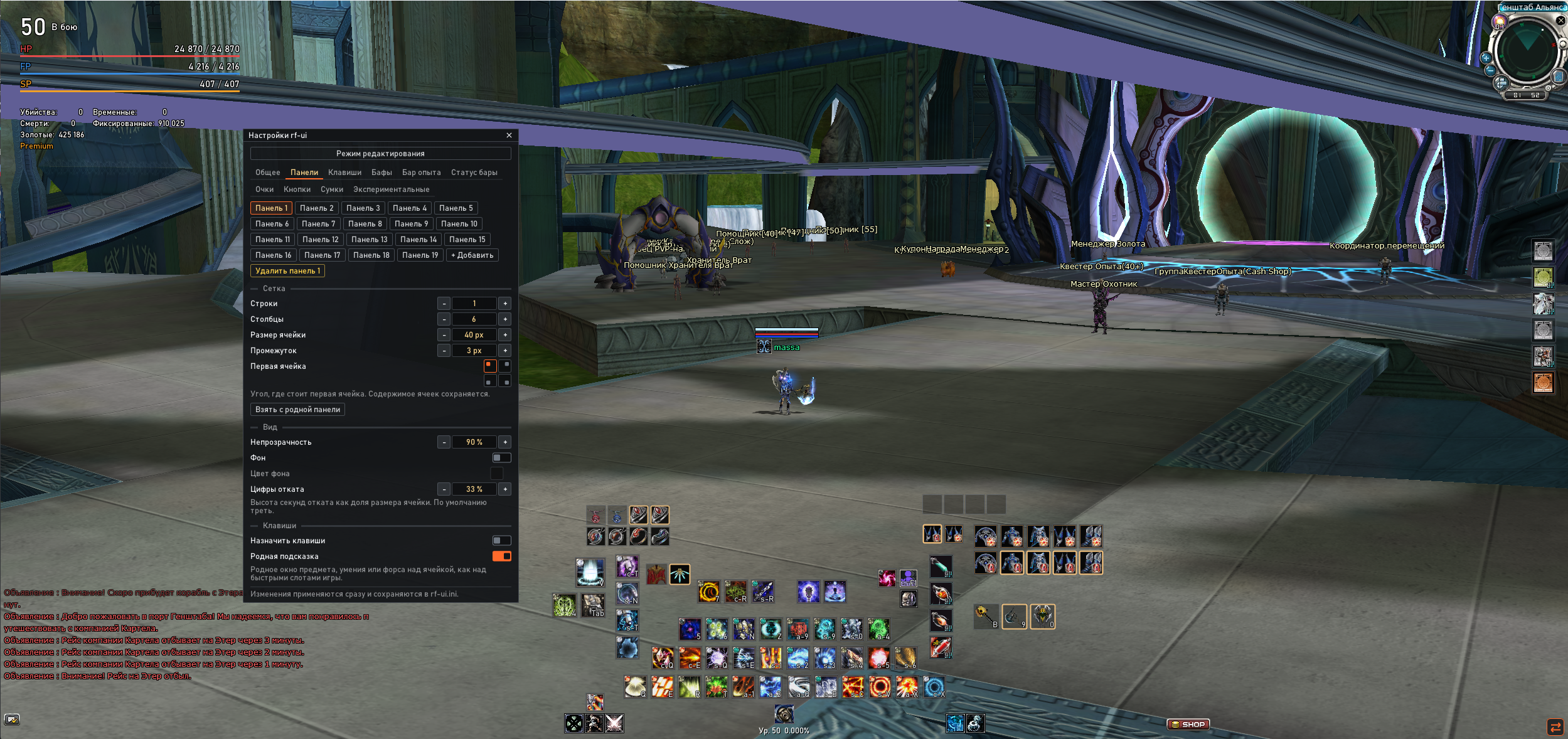
Небольшая DLL (dinput8.dll), которая кладётся в папку клиента и добавляет гибкую настройку интерфейса: свои панели быстрых слотов, перенос баффов, свой HUD статуса, кнопки, оптимизацию свечений. Всё настраивается прямо в игре. Конфиги хранятся локально в папке с клиентом.- Только интерфейс. Сеть, пакеты и игровые механики не трогаются.
- Единственная автоматизация - авто каст прямо с панели.
- Безопасный отказ: если клиент другой версии, мод сам отключается, пишет причину в лог, клиент запускается без проблем.
- Родной интерфейс не ломается: кнопкой в углу можно в любой момент вернуться к стандартному.
- До 30 панелей, у каждой свои строки × столбцы, размер ячейки, отступ, прозрачность, фон, позиция.
- Сами ячейки повторяют функционал оригинальных, каждую ячейку можно назначить за своей кнопкой, либо комбинацией.
- Назначенные клавиши новых ячеек не конфликтуют с стандартной раскладкой панели и раскладкой биндов церба, при переключении на классический интерфейс работают они.
- Кончилась расходка - ячейка серая, но содержимое не теряется, когда предмет появится в инвентаре он станет доступен с панели.
- При заходе нового персонажа сразу появляется панель 5×10, на неё один раз раскладывается родная панель. Родную панель мод скрывает. Так же можно скопировать оригинальную панель кнопкой в настройках.
- Автокаст - кликом Ctrl + ПКМ включает автоматическое применение макроса (альтернатива RfUfree). Автоматически выключается при релоге и выходе.
- Смена позиции и настройка отображения бафов, дебафов, рас бафа, поддержки и допингов.
- Режим редактирования - можно перетащить все элементы нового UI, прижать к соседям, выровнять по сетке или поставить в произвольное место зажав Shift.
- Режим клавиатуры сам включается при входе.
- Можно скрыть панель "Ресурс руды".
- Эскпорт и импорт настроек, несколько цветовых схем, русский и английский язык.
- Добавлена возможность отключать и включать обратно конкретные типы свечения прямо в игре.
- Добавлена возможность сделать три пресета свечения.
- В меню добавлена кнопка цикличного переключения пресетов.
- Закройте игру и лаунчер.
- Скопируйте dinput8.dll в папку клиента, туда, где лежит RF_Online_4gb.bin.
- В настройках лаунчера включите RFOnline 4gb - без него работать не будет (пока что).
- Запустите игру как обычно через лаунчер.
- После входа в мир в правом нижнем углу появится маленькая кнопка 28×28 px. В папке клиента появятся rf-ui.log и, после первой настройки, rf-ui.ini.
- Удаление: закройте игру и удалите dinput8.dll (а также rf-ui.ini и rf-ui.log, если не нужны настройки).
Если в rf-ui.log написано, что клиент неизвестен и функции отключены, значит у вас другая версия клиента: мод ничего не делает, игра работает штатно.
English translate:
A small DLL (dinput8.dll) that goes into the client folder and adds flexible interface customization: custom quick-slot panels, relocatable buffs, a custom status HUD, buttons, and glow optimization. Everything is configured right in the game. Configs are stored locally in the client folder.
- Interface only. The network, packets and game mechanics are not touched.
- The only automation is quick cast right from the panel.
- Fail-safe: if the client is a different version, the mod disables itself, writes the reason to the log, and the client starts without any problems.
- The native interface is not broken: you can switch back to the standard one at any time with the button in the corner.
- Up to 30 panels, each with its own rows × columns, cell size, spacing, transparency, background and position.
- The cells repeat the functionality of the original ones; each cell can be bound to its own key or a key combination.
- Keys assigned to the new cells don’t conflict with the standard panel layout or the Cerberus keybind layout; when you switch to the classic interface, the native ones work.
- Out of consumables - the cell turns gray, but its content is not lost; when the item appears in your inventory, it becomes available from the panel again.
- When a new character logs in, a 5×10 panel appears right away, and your native quick-slot panel is laid out onto it once. The mod hides the native panel. You can also copy the original panel with a button in the settings.
- Autocast - Ctrl + RMB enables automatic use of a macro (an alternative to RfUfree). It is turned off automatically on relog and on exit.
- Change the position and display settings of buffs, debuffs, race buff, support and doping.
- Edit mode - you can drag all elements of the new UI, snap them to neighbors, align them to a grid, or place them anywhere by holding Shift.
- Keyboard mode turns on by itself on login.
- You can hide the “Ore resources” panel.
- Settings export and import, several color schemes, Russian and English languages.
- Added the ability to turn specific glow types off and back on right in the game.
- Added the ability to make three glow presets.
- Added a menu button that cycles through the presets.
- Close the game and the launcher.
- Copy dinput8.dll into the client folder, where RF_Online_4gb.bin is located.
- In the launcher settings, enable RFOnline 4gb - it won’t work without it (for now).
- Start the game as usual through the launcher.
- After entering the world, a small 28×28 px button will appear in the bottom-right corner. rf-ui.log will appear in the client folder, and rf-ui.ini will appear after the first setup.
- Uninstall: close the game and delete dinput8.dll (and also rf-ui.ini and rf-ui.log if you don’t need the settings).
If rf-ui.log says that the client is unknown and the features are disabled, it means you have a different client version: the mod does nothing and the game runs normally.
Скачать/Download:
1. https://github.com/r3ngr4y/rf-ui-releases/releases/latestВот такая вот хуйня собачка! Похвалить можно на странице скачивания релиза, там есть кнопка. О проблемах, багах, пожеланиях и т.д. можно писать сюда. Я
If rf-ui is useful to you, you can leave a tip on the release page. Bug reports and feature requests go here. I’ll try to reply and fix things when I can, but not during the first week.
Последнее редактирование:


